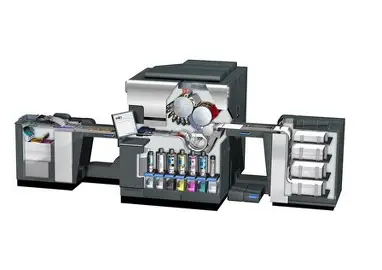
When it comes to top-notch printing solutions, Hp Indigo Inkreally is a game-changer for a lot of businesses out there. I recently read in a report by Smithers Pira that the digital printing scene is expected to grow by over 7% each year — and a big reason for that is advancements in ink technology. Hp Indigo Ink, in particular, is a key player in this growth, offering incredible color accuracy and top-tier print quality for a whole range of applications.
That said, getting the best results with HP Indigo Ink isn’t just about pouring ink and pressing go. You gotta pay attention to the details — things like what kind of substrate you're using, whether the ink plays nicely with the materials, and how you set up your printer. A study from the Printing Industries of America actually points out that if you don’t get these settings right, you might end up with color mismatches or wasted supplies. So, it’s pretty clear — knowing how to manage the ink properly really matters. While many folks love how flexible HP Indigo Ink is, you’ll want to keep checking and tweaking your process to really make the most of it.
Getting the hang of the right techniques can seriously take your print quality up a notch and boost your efficiency, but it’s not without some challenges. Reflecting on best practices is super important — nobody wants to run into avoidable issues, especially with such high-performance inks. The industry’s evolving fast, so staying adaptable and always looking to improve is pretty much essential if you wanna stay ahead.

HP Indigo Ink Overview: Types and Applications
HP Indigo Ink offers a range of ink types suited for various applications. The most notable is Hp Indigo Electroink Ink, known for high-quality prints. Research indicates that Electroink is key for achieving vivid colors and sharp details. The inks are used widely in labels, packaging, and commercial printing.
Choosing the right Electroink type improves print quality. There are several options, including standard and specialty inks. Each option serves specific needs, from short runs to intricate designs. It's crucial to select the ink that matches the substrate and final product requirements. Sometimes, even the smallest differences can impact the final outcome.
Tip: Always test different ink types on various substrates before final production. This testing phase can reveal how colors will appear once printed. Additionally, monitor ink performance consistently. This ensures that you achieve optimal results in your printing projects. Don't overlook the importance of maintenance; regular checks of your printing equipment can prevent issues.
Understanding Ink Properties: Viscosity and Surface Tension
Viscosity and surface tension are crucial properties of ink in the printing process. Viscosity refers to how thick or thin an ink is. High viscosity inks flow slowly, which can lead to clogs in printing heads. This can cause delays and frustrations. On the contrary, low viscosity inks flow easily but may not adhere well to certain surfaces. It’s essential to find the right balance for optimal results.
Surface tension is another vital factor. It describes how the ink interacts with surfaces. High surface tension can prevent ink from spreading evenly. This leads to uneven prints and potential color issues. Conversely, low surface tension allows better adhesion and a smoother finish but might cause bleeding on some substrates. Understanding these properties helps improve printing quality.
Monitoring these properties is an ongoing process. Ink formulations can vary, affecting performance. Regular testing and adjustment may be necessary. Keep an eye on the printing environment, as humidity and temperature also influence these factors. Small changes can have significant impacts on print quality. Understanding viscosity and surface tension is key to mastering the printing process.
Optimal Temperature Conditions for Ink Performance
Temperature plays a vital role in ink performance. If the temperature is too low, ink can become thick and unusable. In contrast, high temperatures may lead to quick evaporation. Both extremes can ruin print quality and consistency. Aim for a moderate temperature range to enhance fluidity.
Monitoring the environment is essential. Keep the printing area between 65°F to 75°F (18°C to 24°C). This range optimizes ink viscosity. Humidity levels should also be controlled. Excess moisture can affect ink adhesion, while too little can cause static issues. A balanced environment is key for durability and vibrancy.
Avoid neglecting equipment maintenance. Regularly check printers for temperature fluctuations. Use thermometers and hygrometers for accurate readings. Each print run is unique, so adjustments may be necessary. Sometimes, small deviations lead to significant quality issues. Being proactive can minimize costly reprints.
Ink-to-Substrate Compatibility: Ensuring Quality Print Results
Ink-to-substrate compatibility is crucial for achieving high-quality print results. A study from the Printing Industries of America found that 67% of quality issues stem from mismatched inks and materials. This underlines the importance of selecting the right ink for each substrate. Ink Hp Indigo is designed to interact with various media types, but careful consideration is essential.
One tip for optimal results is to test inks on your chosen substrate before the main print run. This can prevent costly errors and ensure the colors achieve their intended vibrancy. Additionally, the Environmental Protection Agency suggests that maintaining consistent environmental conditions, such as humidity and temperature, can significantly impact adhesion and drying times.
Awareness of substrate limitations is vital. Certain materials may not adhere well to specific inks, leading to smudging or fading. Experimentation may be needed to find the perfect match. Always keep records of successful ink and substrate combinations to streamline future projects. Quality imprintery depends not only on technology but also on a deep understanding of material capabilities.
HP Indigo Ink Essential Tips for Optimal Printing Results
| Dimension | Recommendation | Comments |
| Ink Type | Use compatible ink for the substrate | Pre-testing ink on a sample substrate is recommended to ensure compatibility. |
| Substrate Material | Select materials like paper, plastic, or metal as per the project needs | Different substrates require specific ink formulations for best results. |
| Environmental Conditions | Maintain stable humidity and temperature levels | Extreme conditions can affect ink performance and drying times. |
| Print Speed | Adjust speed based on ink type and substrate | Faster speeds may lead to lower quality if not properly calibrated. |
| Ink Layering | Limit layering to avoid bleeding | Multiple layers can enhance color, but too many may compromise integrity. |
Maintenance Tips for HP Indigo Printing Systems and Inks
When working with printing systems, proper maintenance is crucial for achieving high-quality results. Regularly cleaning the printheads may help prevent clogging. Neglecting this step can lead to uneven prints and wasted materials.
In addition to cleaning, monitor the ink levels frequently. Low ink can result in distorted colors and inconsistent finishes. It’s advisable to have a schedule for ink inventory checks. This simple practice reduces the chances of unexpected downtime and ensures vibrant output.
Temperature control in the printing environment also plays a significant role. Extreme heat or cold can affect ink consistency. Maintaining stable conditions will promote better adhesion and enhanced print quality. Be aware of how humidity impacts ink drying times, too. Balancing these factors can be tricky, but it’s worth the effort for optimal results.
HP Indigo Ink Usage and Maintenance Tips
This chart represents the monthly usage of different types of inks in HP Indigo printing systems. Maintaining optimal ink levels is crucial for achieving the best printing results.
Scheduled Ink Testing: Frequency and Best Practices
Scheduled ink testing is crucial for achieving optimal results in printing. Regular assessment of ink quality can prevent costly mistakes. Industry reports suggest that companies performing weekly ink tests experience fewer print defects. This frequency allows for immediate detection of ink issues, enhancing overall print quality.
Incorporate these tips into your ink testing routine. First, maintain a controlled environment for testing. Temperature and humidity can significantly affect ink performance. Regularly calibrate equipment to ensure accuracy in your tests. Keeping a log of test results can help identify patterns and improve your process over time.
Consider the lifespan of your Ink Indigo Hp products as well. Even high-quality ink can degrade if not stored properly. Test ink batches before significant print jobs to mitigate risks. Accidental contamination can lead to unexpected color shifts. Take the time to ensure that your ink is fresh and ready for use. Regular ink testing fosters a culture of quality assurance and can ultimately enhance customer satisfaction.
Environmental Factors Impacting HP Indigo Ink Quality
Environmental factors significantly influence the quality of HP Indigo ink during printing. Humidity plays a critical role. High humidity can lead to ink bleeding, causing color misalignment. Conversely, too low humidity may cause static issues, affecting the print's consistency. Industry studies suggest that maintaining humidity levels between 40% and 60% yields the best results for ink quality.
Temperature is another important element. Optimal temperatures between 20°C and 25°C are recommended for HP Indigo 5500. Variations can impact the viscosity of the ink, thus affecting the print's clarity and texture. In a survey conducted by the Printing Association, nearly 30% of print professionals noted temperature fluctuations as a common issue, highlighting its significance.
Moreover, the quality of paper interacts with these environmental factors. Paper absorbs moisture and temperature, directly impacting ink performance. Using papers specifically designed for Ink Hp Indigo 5500 can mitigate issues. Yet, not all paper products perform equally under environmental stressors. Therefore, understanding and controlling these elements is key in achieving optimal printing outcomes. Adjustments in the pressroom setup can lead to significant improvements in print quality and consistency.
Maximizing Print Quality: The Impact of ElectroInk Compatibility on HP Indigo Series S4 Performance Metrics
ElectroInk compatibility is a critical factor in optimizing the performance of digital presses, particularly within the HP Indigo Series S4. The right ElectroInk can significantly enhance print quality, ensuring consistent and vibrant color reproduction that meets the high standards of the professional digital printing industry. According to industry reports, printers utilizing compatible ElectroInk formulations have reported up to a 50% cost reduction compared to traditional OEM inks, allowing for greater flexibility and profitability without compromising on quality.
Recent evaluations show that advancements in ElectroInk technology not only deliver superior print quality but also improve operational efficiency. Printers in over 100 countries have given positive feedback on the latest compatible ElectroInk solutions, highlighting their ability to produce exceptional color output and clarity on various substrates. The benefits extend beyond mere cost savings, demonstrating that carefully formulated ElectroInk can cater to the demanding needs of modern printing applications, offering a competitive edge in the market.
For businesses focused on maximizing print quality while managing costs, investing in high-performance ElectroInk compatible with the HP Indigo Series S4 presents an opportunity to enhance productivity and ensure high-quality results. By choosing innovative solutions that prioritize reliability and consistency, printers can achieve outstanding performance metrics that resonate with customer expectations across diverse markets.
FAQS
: HP Indigo offers standard and specialty Electroink types for various applications, including labels and packaging.
Choosing the right ink improves print quality and influences color vibrancy and sharp details of the final product.
Always test different inks on various substrates before production to see how colors will look when printed.
Low temperatures can thicken ink, while high temperatures can cause evaporation, negatively impacting print quality.
Maintain the printing area between 65°F to 75°F (18°C to 24°C) to enhance ink fluidity and performance.
Excess moisture can hinder adhesion, while low humidity may cause static, both affecting print quality.
Ongoing equipment checks help identify temperature fluctuations and prevent issues that may require costly reprints.
Yes, each run is unique, and even small deviations in conditions can lead to significant quality problems.
Use thermometers and hygrometers to ensure accurate temperature and humidity readings in your printing space.
Some might skip testing, thinking it unnecessary, yet this can compromise print quality and result in disappointment.
Conclusion
The article delves into essential tips for achieving optimal printing results with HP Indigo Ink. It begins by providing an overview of the various types of HP Indigo Ink and their applications, which is crucial for selecting the right ink for specific printing projects. Understanding the properties of ink, particularly viscosity and surface tension, plays a key role in ensuring print quality.
The article also highlights the importance of maintaining optimal temperature conditions for ink performance and emphasizes the need for ink-to-substrate compatibility to guarantee high-quality outputs. Regular maintenance of printing systems and inks, along with scheduled ink testing, is recommended to identify potential issues and uphold print standards. Lastly, the impact of environmental factors on ink quality is discussed, underscoring the significance of creating the right conditions for HP Indigo Ink to thrive, ultimately leading to superior print results.